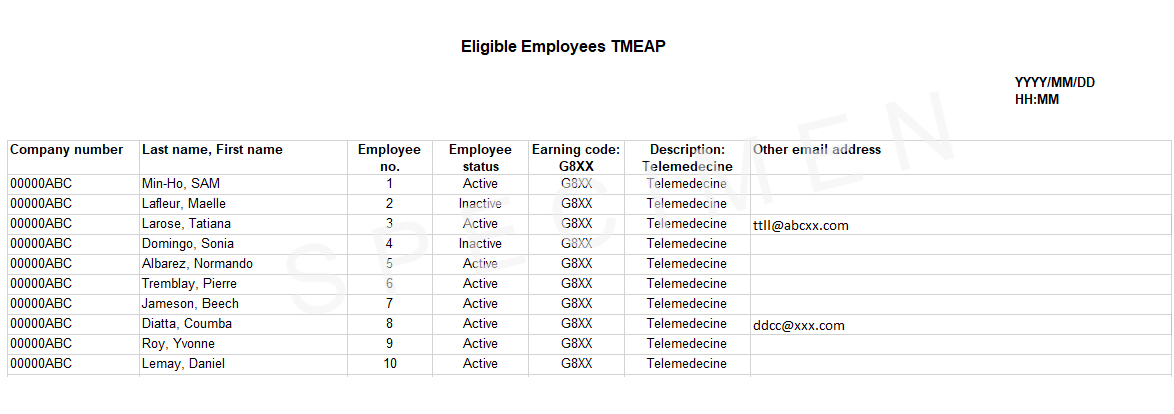
✓This Excel report is available exclusively for the Internet Payroll solution and to clients who have subscribed to our telemedicine service, which offers virtual healthcare, wellness support, and an employee assistance program (EAP). Click here to learn more about this offer
Dialogue is a leading Canadian provider of 24/7 virtual health and wellness care. Delivered through a state-of-the-art, intuitive digital platform, our services keep your workforce supported whenever they need it. ⇨You can provide your employees with round-the-clock access to unlimited virtual medical consultations and a premium employee assistance program. ⇨You’ll also enjoy preferred group rates on all telemedicine services. ⇨To activate this service, please use our Contact us feature ( |

✓Use this report to view and track eligible employees who have completed or are pending enrolment.
✓Application managers hold default access permissions and can grant report access to users with “User—access to functions” privileges. To do this:
oGo to the User management menu.
oClick User list and select the desired user.
oIn the left-hand menu, select Access to functions (under the User profile section).
oScroll to the bottom of the Telemedecine (TMEPA) section, select Complete access, and save your changes.
Steps to generate the report
1If you manage multiple companies, select the desired company profile.
2Select the telemedicine-associated Earnings code (TMEPA).
3If needed, change the report’s language settings.
4Click Download and save the file to your device. See an example of the report
|